Back to projectsFeatured case study
PDF Tool
Offline desktop utility that consolidates repetitive PDF operations into one predictable workspace.
Context
Built around a practical workflow problem: common PDF tasks are simple on their own, but usually scattered across multiple tools and websites.
Problem
Routine PDF tasks like merging, splitting, extracting, rotating, and compressing are common, but switching tools for each one creates unnecessary friction.
Solution
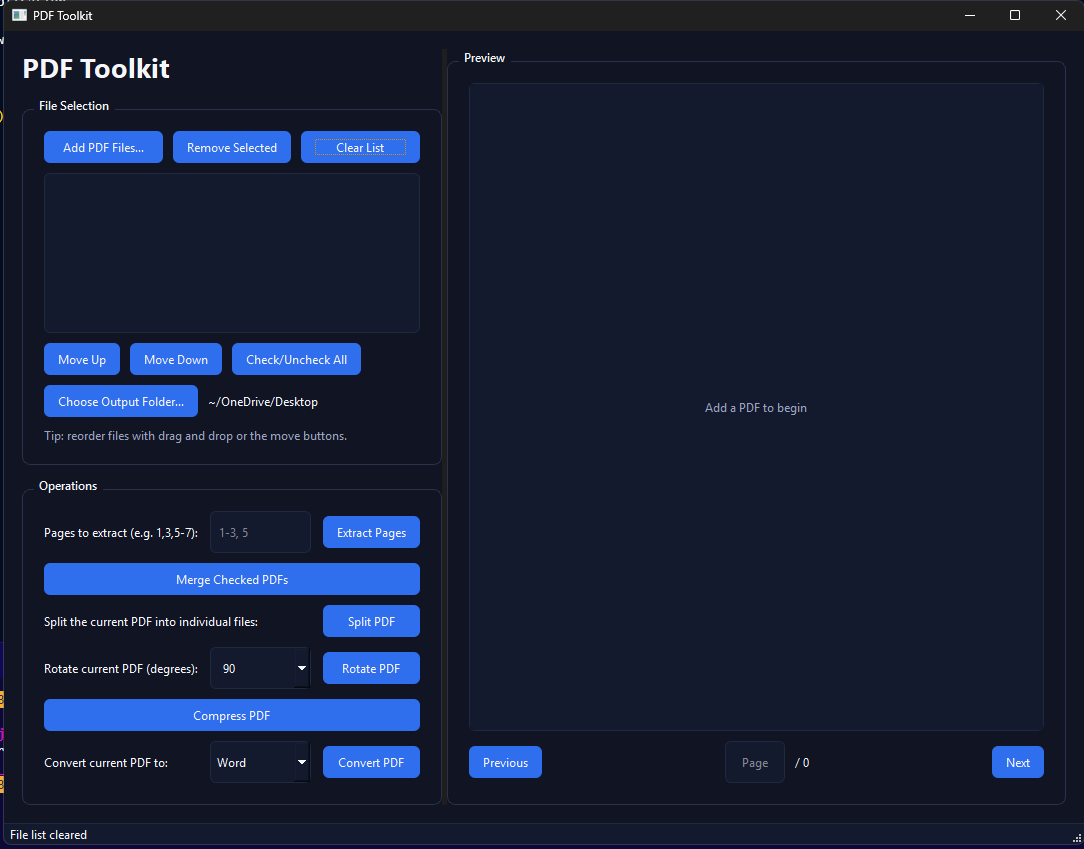
PDF Tool packages several proven Python PDF libraries into a single PyQt6 desktop interface so the user can stay in one workflow from input to output.
Key decisions
- -Kept the app offline-first to avoid upload friction and make the tool more practical for repeated local use.
- -Grouped related actions into one interface instead of optimizing for a single PDF operation.
- -Used mature libraries behind the scenes so the value came from workflow design, not reinventing document processing primitives.
Screenshots
Key features
- -Merge multiple PDFs into one
- -Split PDFs into individual pages
- -Extract specific page ranges
- -Rotate pages for correction
- -Compress PDFs to reduce file size
- -Convert PDFs to other formats (where supported)
Results
- -Reduced a multi-tool document workflow to one local utility.
- -Demonstrated practical desktop product design rather than a single-script utility.
- -Added a portfolio piece that shows packaging multiple technical capabilities behind a simpler user experience.
Stack
PythonPyQt6PyPDF2PyMuPDFpdf2docx