Back to projectsFeatured case study
Video Download App
PyQt5 desktop app that makes yt-dlp and FFmpeg downloads approachable for non-terminal workflows.
Context
Built to make a powerful but terminal-heavy media-download stack approachable from a desktop UI, especially for repeated downloads and platform-specific edge cases.
Problem
yt-dlp is powerful, but remembering flags and post-processing steps adds friction when you just want a quick download or conversion.
Solution
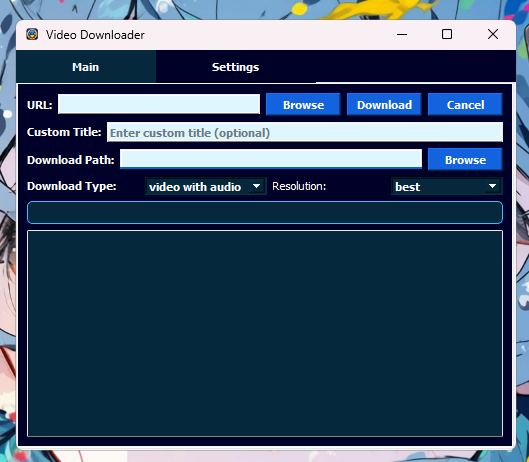
A GUI wrapper around yt-dlp with FFmpeg post-processing for conversions, keeping the toolchain explicit and the workflow repeatable.
Key decisions
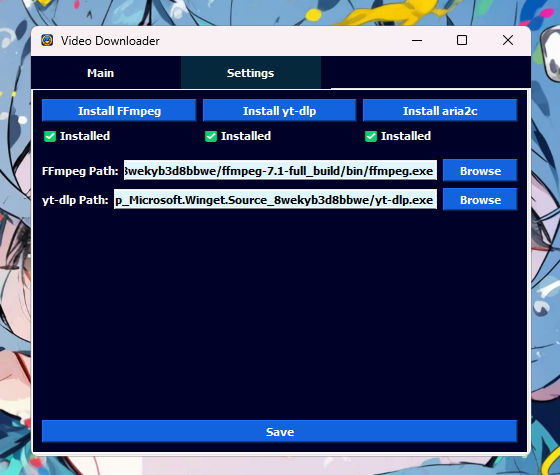
- -Exposed installation and update flows for FFmpeg, yt-dlp, and aria2c directly in the app instead of assuming the environment was already configured.
- -Added pause/resume, logs, and batch input because downloads fail, stall, or expand beyond a single URL in real-world use.
- -Included platform-specific handling for Twitch, playlists, browser cookies, and client fallback to improve success rate on harder sources.
Screenshots
Key features
- -Download video or audio using yt-dlp
- -Select available format and quality options
- -FFmpeg post-processing for conversion or remuxing
- -Desktop workflow for repeatable downloads
- -Simple configuration and output selection
Results
- -Turns a CLI-centered media workflow into a fuller desktop product with setup, downloading, and troubleshooting in one place.
- -Shows practical engineering around third-party tooling, edge cases, and user feedback loops.
- -Makes the project stronger than a thin yt-dlp wrapper by covering installation, retries, and platform quirks.
Stack
PythonPyQt5yt-dlpFFmpeg