Back to projectsFeatured case study
Transcriber
Desktop transcription workflow that turns supported media URLs into structured transcripts without juggling terminal tools.
Context
Created around a repeated workflow: downloading media, selecting the right transcription backend, and formatting clean output usually requires several separate tools.
Problem
Transcribing audio from any URL supported by yt-dlp (including YouTube videos and playlists) required memorizing yt-dlp/ffmpeg flags and juggling multiple tools for backend selection and output formatting.
Solution
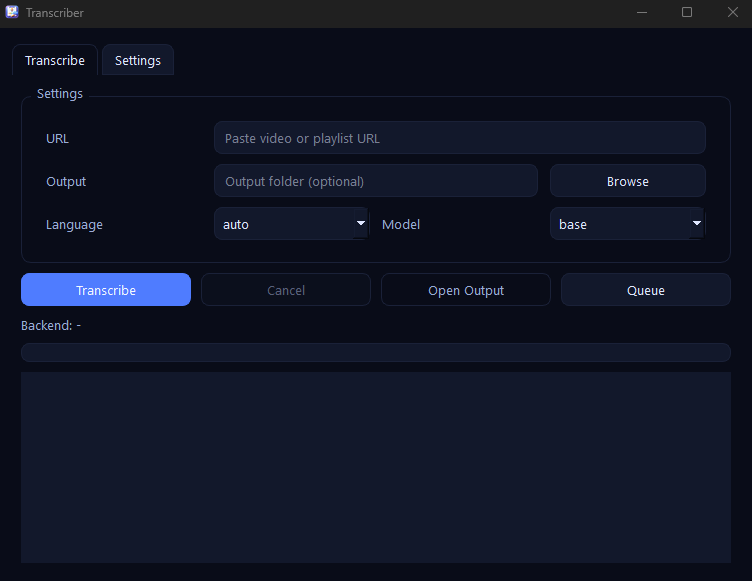
Transcriber wraps yt-dlp, Whisper, and FFmpeg in a focused PyQt6 workflow where the user can choose model, backend, language, and output preferences without leaving the app.
Key decisions
- -Exposed backend choice explicitly so the workflow can adapt to CUDA, DirectML, or CPU depending on the machine.
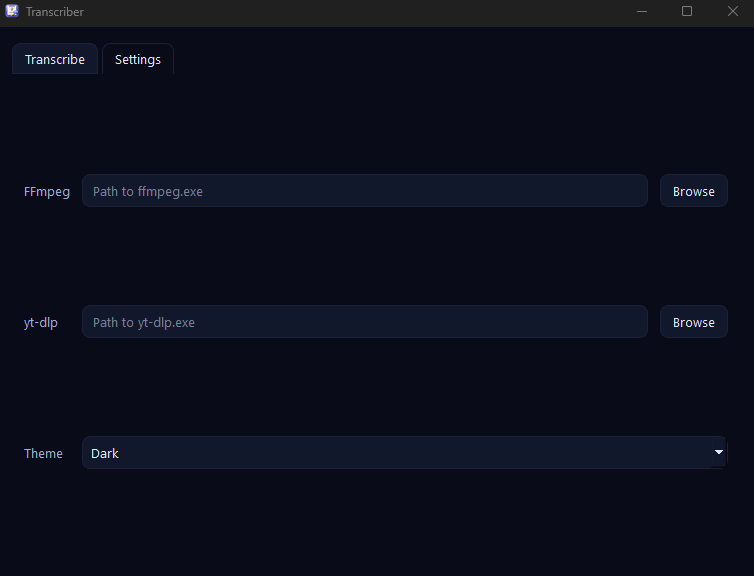
- -Included visible logs and configurable paths because media and transcription pipelines fail in real-world ways that users need to inspect.
- -Exported Markdown with metadata so the output is useful beyond raw text capture.
Screenshots
Key features
- -Download audio from single videos or entire playlists using yt-dlp
- -Select Whisper model (tiny/base/small/medium) with language or auto-detect
- -Choose CUDA, DirectML, or CPU backend and keep logs visible
- -Customize ffmpeg/yt-dlp paths, output folder, and theme (system/light/dark)
- -Export transcripts as Markdown files that include video metadata
Results
- -Turned a multi-tool terminal-heavy workflow into a single desktop experience.
- -Shows stronger product thinking around AI tooling, configuration, and output quality.
- -Adds a portfolio piece with clear value for creators, researchers, or anyone working with long-form audio content.
Stack
PythonPyQt6OpenAI Whisperyt-dlpFFmpegPyTorch